Undeposited Funds
Reconciliation
Bring clarity to the money sitting between your accounting records and the bank.
A structured workflow for identifying outstanding deposits, matching transactions, investigating discrepancies, and maintaining a consistent reconciliation process.
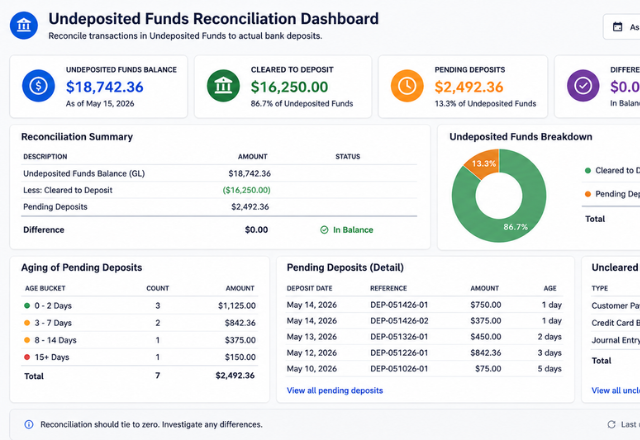
Money shouldn't disappear between systems.
Undeposited funds can become difficult to manage when payments, deposits, batches, and bank activity don't align cleanly.
Without a consistent process, accounting teams can spend unnecessary time determining:
From scattered transactions to a clean reconciliation.
The goal is simple:
📥 Import
Pull your undeposited funds report and bank deposit data into a consistent, structured format. Built around your software's export — no manual reformatting required.
🔗 Match
Match payments in the undeposited funds account to confirmed bank deposits. Matched items are cleared, leaving only the exceptions that need attention.
🔍 Identify Outstanding Items
Unmatched transactions are surfaced clearly — aged by days outstanding, flagged by type, and prioritized so your team knows exactly where to focus.
📋 Investigate & Document
Each exception is investigated and classified — timing difference, duplicate entry, misapplied payment, or posting error. Resolutions are documented with notes and supporting detail for a complete audit trail.
Your accounting system. Your reports. Your workflow.
Every business processes payments and deposits differently. Rather than forcing your process into a generic spreadsheet, this workflow is built around the way your accounting actually works.
Your workflow can be customized around:
It's to build a reconciliation process that fits the way your accounting actually works.
Ready to bring clarity to your undeposited funds?
Tell us about your accounting software, payment process, and deposit structure — we'll follow up to discuss the best solution and provide a custom quote.
Build My WorkflowEvery project is unique. After learning about your workflow and objectives, I'll provide a customized proposal outlining the recommended solution, timeline, and project investment.