Accounts Receivables
Reconciliation
Reconcile your A/R subledger to the general ledger with accuracy and confidence.
This customizable workflow helps accounting teams identify variances, investigate discrepancies, and maintain a clear, repeatable reconciliation process from month to month.
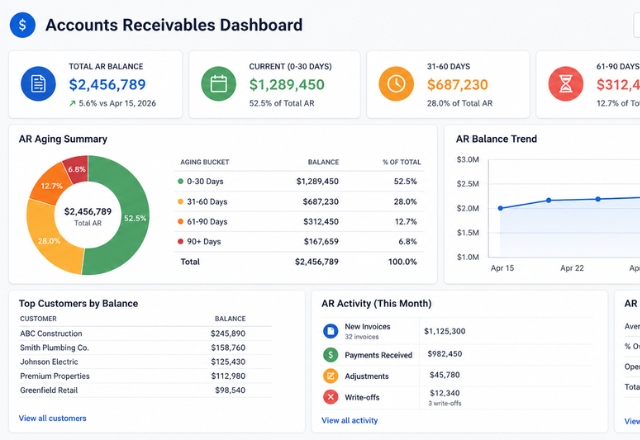
Reconciliation shouldn't be a scavenger hunt.
Accounts receivable reconciliation is one of the most important controls in the accounting close process — but it can become time-consuming when information lives across multiple reports, systems, and spreadsheets.
Manual comparisons make it difficult to quickly determine:
From raw reports to a reconciled balance.
The workflow organizes your source data, compares the relevant balances, identifies discrepancies, and provides a structured place to document the resolution. Instead of rebuilding the reconciliation every month, your team follows a consistent process.
📥 Import & Standardize
Pull data from your A/R subledger and general ledger into a consistent format. No manual reformatting — the workflow handles the structure so you can focus on the numbers.
🔍 Compare & Identify
Side-by-side comparison of subledger and GL balances surfaces variances automatically. Each discrepancy is flagged so nothing gets missed during review.
🔎 Investigate & Classify
Variances are categorized by type — timing, data entry, posting error, or adjustment — so your team can prioritize and resolve efficiently.
📋 Document & Reconcile
Every resolution is documented with notes, supporting details, and sign-off fields. The result is a clean, audit-ready reconciliation record every period.
Your accounting system. Your reports. Your workflow.
Every business handles A/R differently. Rather than forcing your process into a generic spreadsheet, this workflow is built around the way your accounting actually works.
Your workflow can be customized around:
It's to build a reconciliation process that fits the way your accounting actually works.
Ready to build a better reconciliation process?
Tell us about your accounting software, reporting structure, and reconciliation process — we'll follow up to discuss the best solution and provide a custom quote.
Build My WorkflowEvery project is unique. After learning about your workflow and objectives, I'll provide a customized proposal outlining the recommended solution, timeline, and project investment.